

Meet your always up to date Knowledge Base
Your single source of truth for security and RFP answers. Automatically updated from every questionnaire you complete and every policy you change.
See the Knowledge Base in action
Watch how the Knowledge Base answers questionnaires, learns from every response and keeps itself current.
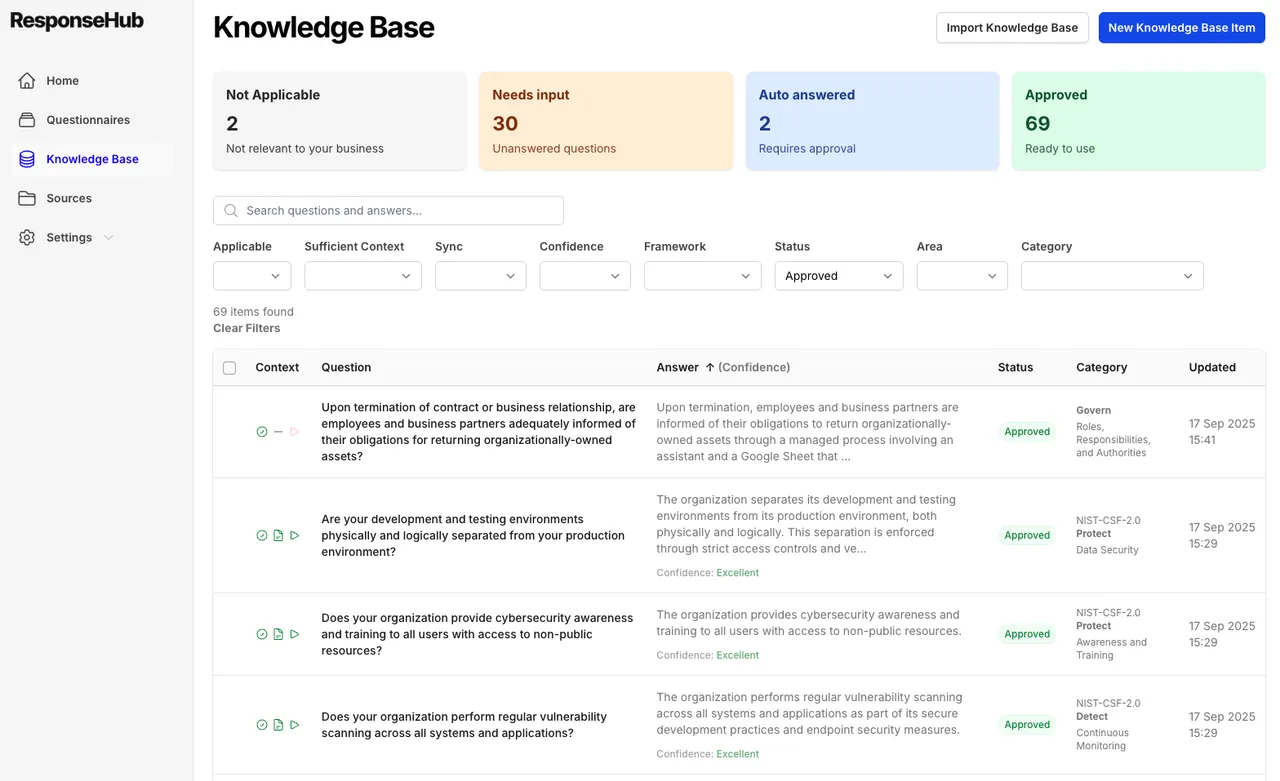
A knowledge base is critical. Maintaining one is hard work.
Answering questionnaires and RFPs without a knowledge base means starting from scratch every time. But keeping one accurate in Notion or a spreadsheet is a job in itself. Read: how to maintain your security questionnaire knowledge base →
Always out of date
Nuances from completed questionnaires never make it back into the knowledge base. Six months later you are copying answers that no longer reflect how your team actually operates.
Time consuming to maintain
Reviewing after every questionnaire, tracking last updated dates, recording alternate wordings. It is a discipline that is hard to keep when you are already sick of the questionnaire you just finished.
Hard to search
"Do you encrypt data at rest?" and "Do you encrypt data on your servers?" are the same question in different words. Unless you record every alternate phrasing, no amount of cmd+f will find the right answer.
Duplicates creep in
The same question gets added twice with slightly different phrasing. The answers drift apart over time, and inconsistent responses end up in front of customers.
How your Knowledge Base builds and maintains itself
Generate your first version
Upload your policies and generate the first version of your Knowledge Base from them, or start from our essential 60 questions template.
Import existing answer libraries
If you have an existing knowledge base in Notion or Google Sheets, export to CSV and import it. You can also import old questionnaires and ResponseHub will pull out the questions and answers.
Deduplicate
The deduplicator works on meaning rather than keywords, so it finds similar questions even when they are phrased differently and gives you the opportunity to merge them into a single entry.
Automatic updates
AI-suggested additions flow in from every completed questionnaire, and when your policies change you can resync your Knowledge Base to update the answers with the new content.
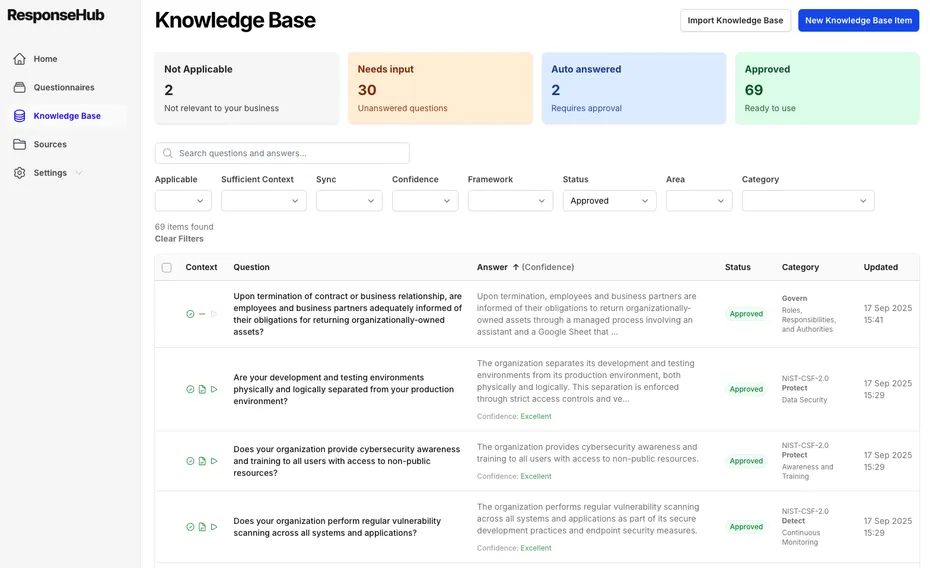
See how the Knowledge Base works under the hood
The help center explains Knowledge Base items, semantic deduplication, categorisation and full CSV export in detail.
See how a Knowledge Base makes security questionnaires easier
Get started in under 5 minutes with our self-serve trial or contact us for a demo.
Considering alternatives? Check they have these key features
Not every knowledge base is built the same. These are the features that make the difference day to day.
Semantic deduplication
Not just basic keyword matching. ResponseHub matches on meaning and similarity, so it finds duplicate questions even when they are phrased completely differently.
Full export
You can always take your data with you. Your entire Knowledge Base exports to CSV at any time, no lock-in and no requests to support.
Confidence ratings and citations
Every answer carries a confidence rating and full citations back to the exact source text, so you always know how much to trust it and where it came from.
Import from old questionnaires
Upload your historical questionnaires and ResponseHub pulls out the questions and answers, removes references to customers, and uses them to build your Knowledge Base.
Why teams move their knowledge base out of Notion and spreadsheets
A knowledge base is only as good as your ability to maintain it. Here is how the approaches compare.
What a well maintained Knowledge Base gives you
Consistent, high quality answers
Every questionnaire and RFP draws from the same approved answers, so responses are accurate, well written and consistent wherever they are used.
An accurate single source of truth
One deduplicated Knowledge Base that reflects how your company operates today, not how it operated when someone last remembered to update the spreadsheet.
Your data, always yours
Export your entire Knowledge Base whenever you need to. Full CSV export is available at any time, so you are never locked in.
Frequently asked questions
How can I import answers into the Knowledge Base?
There are two ways. If you have an existing answer library in Notion or Google Sheets, export it to CSV and import it directly. You can also import from old questionnaires: upload them and ResponseHub will pull out the questions and answers, remove references to specific customers, and use them to build your Knowledge Base.
Can I generate my Knowledge Base from my policies?
Yes. Upload your policies and ResponseHub can generate the first version of your Knowledge Base from them. You can use our essential 60 questions template as the starting structure, so your Knowledge Base covers the questions that appear in nearly every questionnaire.
What about when I leave ResponseHub, can I export my data?
Yes, there is a full export. Your Knowledge Base is fully exportable in CSV format, and your questionnaires and RFPs can be downloaded in their original format (docx / xlsx) or in CSV format. Your data is always yours to take with you.
What happens when I upload a new policy?
Any time your policies change, you have the option to resync your Knowledge Base. ResponseHub reviews your answers against the new content and updates them, so your Knowledge Base always reflects your current security posture.
Book a demo
Pick a time that works for you
Grab a 30-minute slot straight from the calendar. No forms, no waiting on a reply.
Book a demo